
Published: Jan 8, 2026 by R. Vleeshouwers
Published: Jan 8, 2026 by R. Vleeshouwers
If you’re interested in AI image generation and have experimented with Stable Diffusion, you’ve probably encountered various web interfaces and tools. One that stands out for its flexibility and power is ComfyUI - an open-source, node-based graphical user interface that lets you create complex AI image generation workflows visually, without writing code.
ComfyUI is a powerful interface built for Stable Diffusion that uses a node-based system. Instead of a traditional form-based interface, you work with nodes connected together in a visual workflow. Each node represents a specific function or process in the image generation pipeline, such as loading models, applying prompts, controlling sampling parameters, or post-processing images.
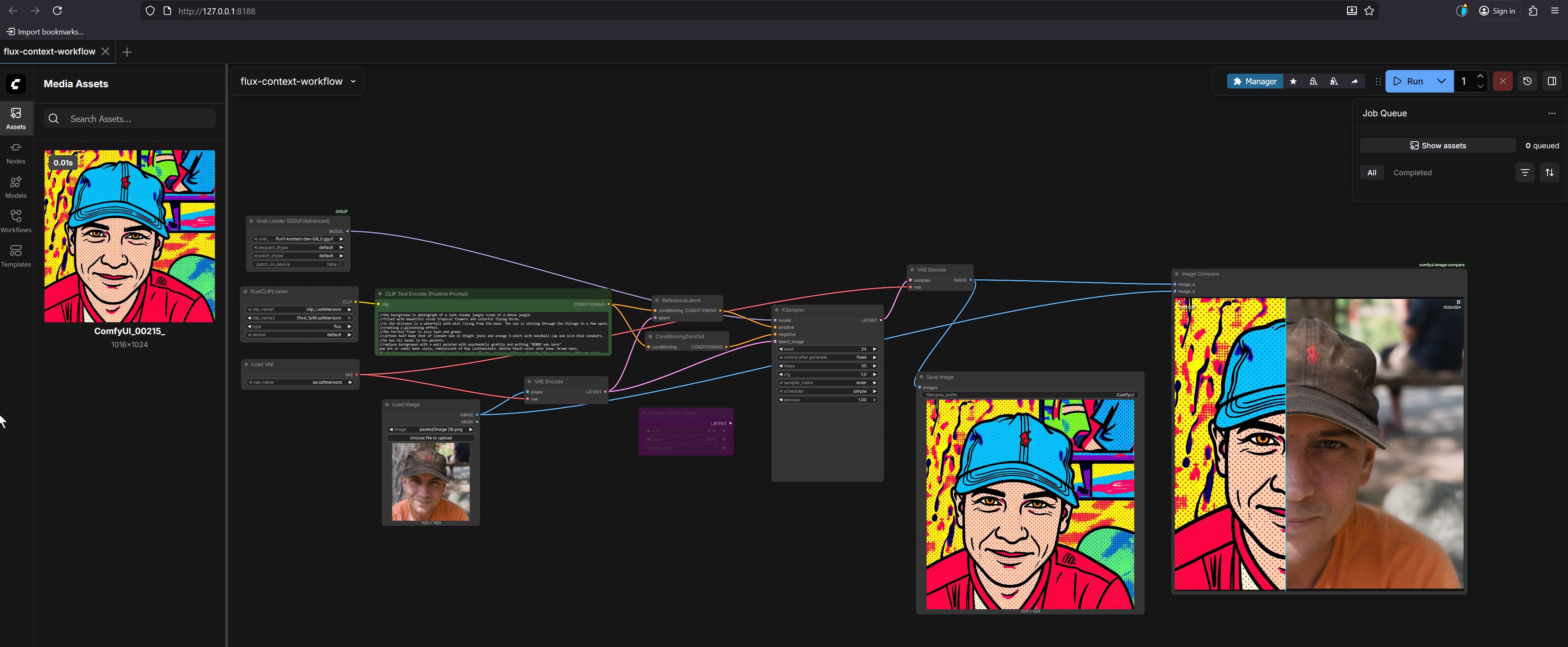
This approach might seem familiar if you’ve used node-based compositing software like Blender’s Shader Editor or Nuke. If you’re comfortable with visual programming, ComfyUI will feel natural. If not, there’s a learning curve, but the flexibility it provides is worth the investment.
Flexibility and Control
Unlike simpler interfaces that hide complexity, ComfyUI exposes the entire image generation pipeline. You can see exactly what’s happening at each step and modify any part of the process. This level of control allows you to create workflows that simply aren’t possible with traditional interfaces.
Workflow Reusability
One of ComfyUI’s strongest features is the ability to save workflows as JSON files. Once you’ve created a workflow that produces the results you want, you can save it and reuse it later. You can also share workflows with others or load workflows shared by the community. This makes it easy to build up a library of proven workflows for different types of image generation.
Performance Optimization
ComfyUI is designed with performance in mind. When you modify a workflow and run it again, only the parts that changed are re-executed. This optimization can save significant time, especially when iterating on complex workflows or experimenting with different settings.
Multiple Model Support
ComfyUI supports various Stable Diffusion models including SD1.x, SD2.x, and SDXL, as well as loading checkpoints and safetensors models. It also supports upscaling models like ESRGAN and SwinIR, making it a complete solution for AI image generation and enhancement.
ComfyUI is open-source and available on GitHub. You’ll need Python and a compatible GPU to run it locally. The installation process involves cloning the repository and installing dependencies. If you’re comfortable with command-line tools, the setup is straightforward.
For those who prefer not to deal with local installation, cloud-based services like ComfyICU offer serverless access to ComfyUI with high-performance GPUs and pre-loaded models, though this comes with usage costs.
Working with nodes might seem intimidating at first, but it’s actually quite intuitive once you understand the basics. You start with input nodes for your prompt and settings, connect them through processing nodes like model loaders and samplers, and end with output nodes that generate your image.
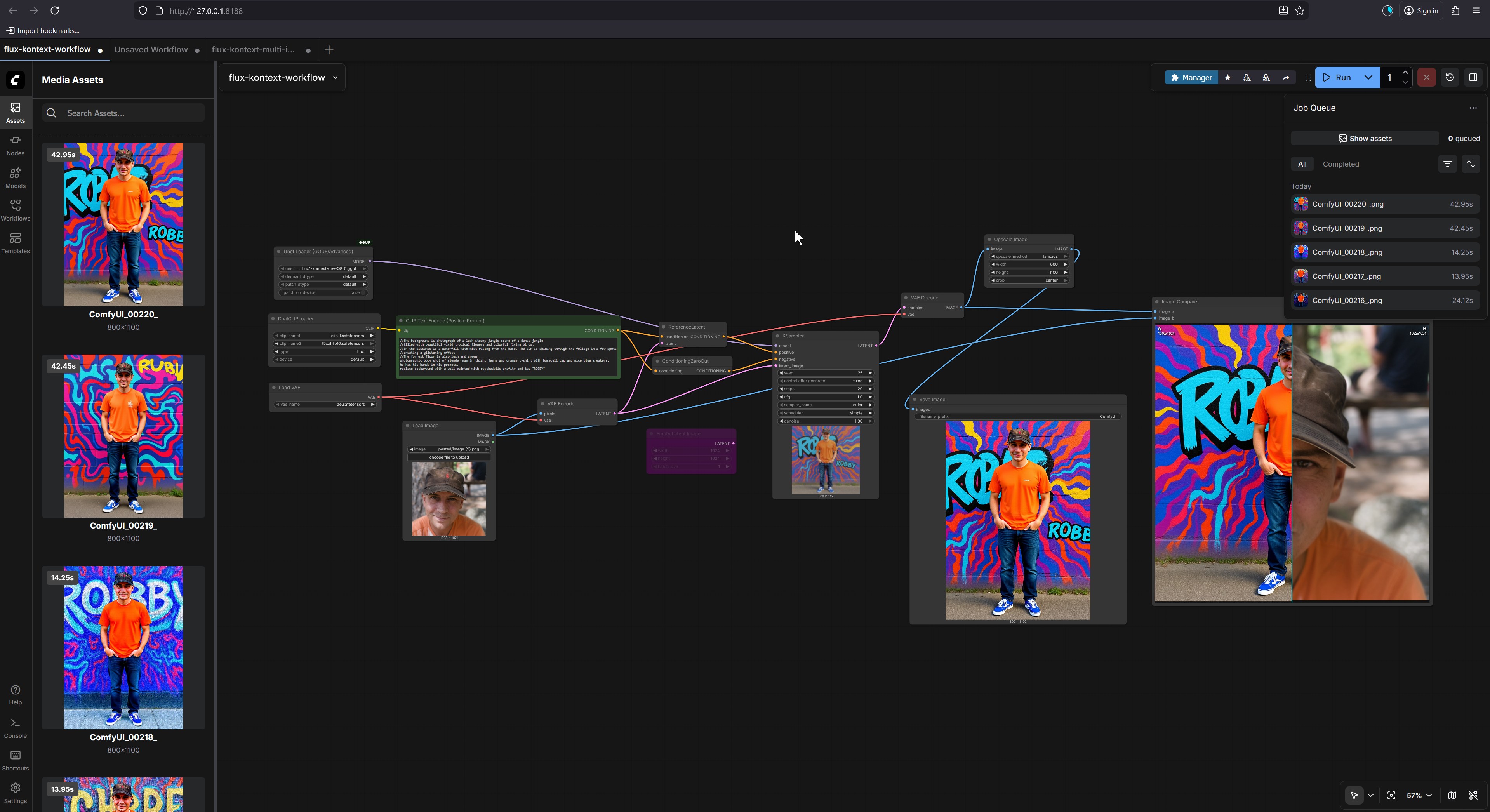
The visual nature of the interface makes it easy to see how data flows through your workflow. You can experiment by adding nodes, modifying connections, and adjusting parameters until you achieve the desired results.
As an open-source project, ComfyUI benefits from active community development. New nodes and features are regularly added, and the community shares workflows, tips, and techniques. If you’re interested in contributing or customizing the tool, the open-source nature means you have full access to modify and extend it.
As someone who works extensively with both technical systems and creative projects like Blender 3D, I’ve found that ComfyUI fits perfectly into a hybrid creative workflow. The node-based approach in ComfyUI shares conceptual similarities with Blender’s node system, making it easier for artists and technical professionals to adapt to both tools.
For my Blender artwork, I often use AI-generated textures and backgrounds to enhance scenes. ComfyUI allows me to create custom workflows that generate exactly the kind of textures I need for specific projects. For example, I can create a workflow that generates realistic stone textures for ancient ruins or organic patterns for natural environments like forests and landscapes, which I then import into Blender for final compositing.
One of the biggest advantages of ComfyUI for creative professionals is the ability to save and reuse complex workflows. When working on similar projects, I can load a pre-configured workflow that already has my preferred settings for resolution, models, and post-processing steps. This saves significant time compared to manually configuring settings each time I want to generate new assets.
ComfyUI’s open-source nature means it can be extended with custom nodes. The community has developed numerous custom nodes that extend functionality beyond the base installation. Some particularly useful ones for creative professionals include nodes for advanced masking, custom upscaling algorithms, and integration with other AI tools.
For those with Python skills, creating custom nodes is straightforward. This allows you to integrate any Python-based AI model or processing technique directly into your ComfyUI workflows. I’ve found this particularly useful for integrating specialized tools that aren’t natively supported.
When working with complex workflows, performance optimization becomes important. ComfyUI’s caching system means that if you modify only part of a workflow, only the changed sections are re-executed. This is especially valuable when iterating on complex scenes where some elements remain constant while others need adjustment.
While AI tools like Stable Diffusion are powerful, they work best when combined with traditional artistic skills. My experience with Blender has taught me the importance of lighting, composition, and attention to detail - skills that translate directly to creating effective prompts and workflows in ComfyUI. The combination of AI generation and traditional artistic refinement often produces results that neither approach could achieve alone.
If you want to dive deeper into ComfyUI, here are some valuable resources to get you started:
ComfyUI is particularly well-suited for users who want more control over their AI image generation process. If you’re happy with simpler interfaces that work out of the box, you might find ComfyUI overcomplicated. However, if you want to create custom workflows, understand what’s happening under the hood, or build reusable processes for consistent results, ComfyUI is an excellent choice.
The node-based approach also makes it appealing to users familiar with visual programming in other creative software. If you’re comfortable with Blender’s node system or similar tools, you’ll likely find ComfyUI’s interface intuitive.
ComfyUI represents a powerful approach to AI image generation, offering flexibility and control that simpler interfaces can’t match. While it requires more initial learning, the ability to create, save, and share custom workflows makes it a valuable tool for serious Stable Diffusion users. As with many open-source tools, the community-driven development means it continues to evolve and improve.
For creative professionals who work with tools like Blender, ComfyUI offers a natural extension to their existing workflow. The combination of AI generation capabilities and traditional artistic skills can produce compelling results that neither approach could achieve alone. The ability to create and refine custom workflows means you can develop a personalized approach to AI image generation that fits your specific creative needs.
If you’re interested in exploring AI image generation beyond basic interfaces, ComfyUI is definitely worth investigating. The open-source nature, combined with its powerful workflow system, makes it a compelling option for anyone serious about AI-generated imagery.
Related Posts:
Share